What is IT asset management (ITAM)? A complete guide
Get a clear view of your organisation’s tech landscape to reduce risk, save time, and boost employee productivity with IT asset management (ITAM).
Justine Caroll
Director, Product Marketing
Last updated 16 June 2026
What is IT asset management (ITAM)?
IT asset management (ITAM) is the practice of tracking and managing an organisation’s IT assets—including hardware, software, and cloud services—throughout their entire lifecycle. It gives teams a clear view of what assets they have, where they are, and how they’re being used. With that visibility, organisations can control costs, reduce risk, and plan their technology more effectively.
IT teams are expected to keep everything running smoothly, but that’s challenging without a clear view of their tech assets. A missing laptop, an unused software licence, or an outdated system can slow down work, create security risks, and drive up costs. As organisations scale, managing every asset becomes more complex.
IT asset management (ITAM) brings order to that complexity. It gives teams a structured way to manage their technology so they know what they have, where it is, and how it’s being used. This visibility helps managers reduce delays, avoid unnecessary spending, and make more informed decisions about their resources.
In this guide, we’ll break down what IT asset management is, why it matters, and how to use it to bring more clarity and control to your IT operations.
As IT environments grow more complex, keeping track of assets is no longer just an operational task, it’s a strategic necessity. Without a clear system in place, organisations struggle to maintain visibility, control, and accountability across their technology. IT asset management (ITAM) provides the foundation teams need to manage that complexity with confidence.
Visibility as a foundation for better decision-making
ITAM gives organisations a complete, up-to-date view of their tech landscape, from physical devices to software and cloud resources. Instead of relying on fragmented data or manual tracking, teams access a single source of truth for all assets. This level of visibility makes it easier to understand how technology is distributed, used, and maintained across the business. With accurate data in place, organisations can plan, prioritise, and manage their IT environment more effectively.
Operational control across complex IT environments
As organisations adopt more tools, platforms, and systems, managing IT assets becomes increasingly difficult to standardise. ITAM introduces structure by creating consistent processes for tracking, updating, and maintaining assets across teams. This reduces inconsistencies and ensures that asset data stays accurate as environments evolve. With clearer oversight, organisations can maintain control even as their IT operations grow more complex.
Risk reduction in an increasingly digital landscape
Modern IT environments introduce new layers of risk, from security vulnerabilities to compliance requirements. Without clear oversight of assets, it becomes harder to identify gaps or enforce policies consistently. ITAM helps organisations stay in control by maintaining accurate records of asset ownership, usage, and lifecycle status. This visibility strengthens governance and drives proactive risk management across the technology landscape.
Enabling scalability in modern IT ecosystems
As businesses grow, their IT environments expand across cloud platforms, remote devices, and distributed systems. Without a structured approach to managing assets, this growth can quickly lead to fragmentation and loss of control. ITAM provides a scalable framework that adapts alongside the organisation, ensuring assets remain visible and manageable over time. This allows teams to support expansion without adding unnecessary complexity.
Supporting business agility and innovation
When teams have reliable, accessible asset data, they can respond more effectively to change. ITAM ensures that information about systems and resources is accurate and readily available, reducing uncertainty when making decisions. This clarity allows organisations to adapt to new priorities, support evolving technologies, and plan with greater confidence. As a result, IT becomes a more reliable foundation for broader business initiatives.
What are the benefits of ITAM?
IT asset management (ITAM) moves organisations from reactive asset tracking to more efficient, controlled operations. With the right data in place, teams can reduce waste, respond to issues faster, and stay aligned with business needs. These benefits show up in how teams manage costs, maintain security, and handle day-to-day IT operations.
Reduced IT costs through smarter asset allocation
ITAM identifies unused, underused, or duplicate assets, making it easier to reallocate existing resources instead of purchasing new ones unnecessarily. By tracking how assets are used, teams can avoid overspending on software licences and hardware that aren’t delivering value. Over time, this leads to more efficient use of IT budgets and fewer wasted investments.
Simplified audits and improved licence compliance
Managing software licences manually can make audits time-consuming and risky. ITAM centralises licence data, simplifying the process of tracking entitlements, usage, and renewal timelines. This keeps organisations aligned with vendor agreements and avoids penalties tied to non-compliance. With accurate records readily available, teams can approach audits with greater confidence and less disruption.
Faster issue resolution with asset-level insights
When a request is logged in a ticketing system, having immediate access to asset data can significantly speed up troubleshooting. IT teams are able to quickly identify the device, software, or configuration involved without relying on manual checks or incomplete information. This reduces back-and-forth with employees and shortens resolution times. As a result, teams can resolve incidents faster and reduce back-and-forth that slows work down.
Improved security through continuous asset tracking
With ITAM, organisations maintain an up-to-date view of all assets, including those that may otherwise go unnoticed. This makes it easier to protect your IT assets by identifying outdated software, unpatched devices, or unauthorised assets that could introduce risk. With continuous tracking, teams are able to identify risks earlier and address issues before they escalate. Keeping asset data current is a key part of reducing exposure in an increasingly complex IT landscape.
More accurate budgeting and lifecycle planning
Reliable asset data makes it easier to plan for future needs and manage costs over time. IT teams can track asset lifecycles, anticipate replacements, and align purchasing decisions with actual usage patterns. This supports more accurate budgeting and mitigates unexpected expenses. With better coordination between IT and procurement, organisations can plan ahead with greater confidence.
What are the types of ITAM?
ITAM includes a wide range of assets across three main categories: hardware, software, and cloud. Here’s a closer look at each.
ITAM type
What it includes
Why it matters
Hardware assets
Desktops, laptops, servers, routers, mobile devices
Tracks ownership, manages lifecycles, and ensures assets are properly maintained, replaced, or retired
Enables accurate licence tracking, prevents overspending on unused tools, and supports compliance with vendor agreements
Cloud and SaaS assets
IaaS, PaaS, and SaaS platforms, subscriptions, and services
Creates visibility into rapidly changing environments, manages usage, controls costs, and maintains security across distributed systems
Each asset category comes with different challenges. Hardware is stable but needs lifecycle tracking to avoid loss, downtime, or waste. Software is more complex, often managed through software asset management (SAM) for licensing and compliance. Cloud and SaaS assets are highly dynamic, making visibility, cost control, and security harder to maintain.
Key ITAM processes
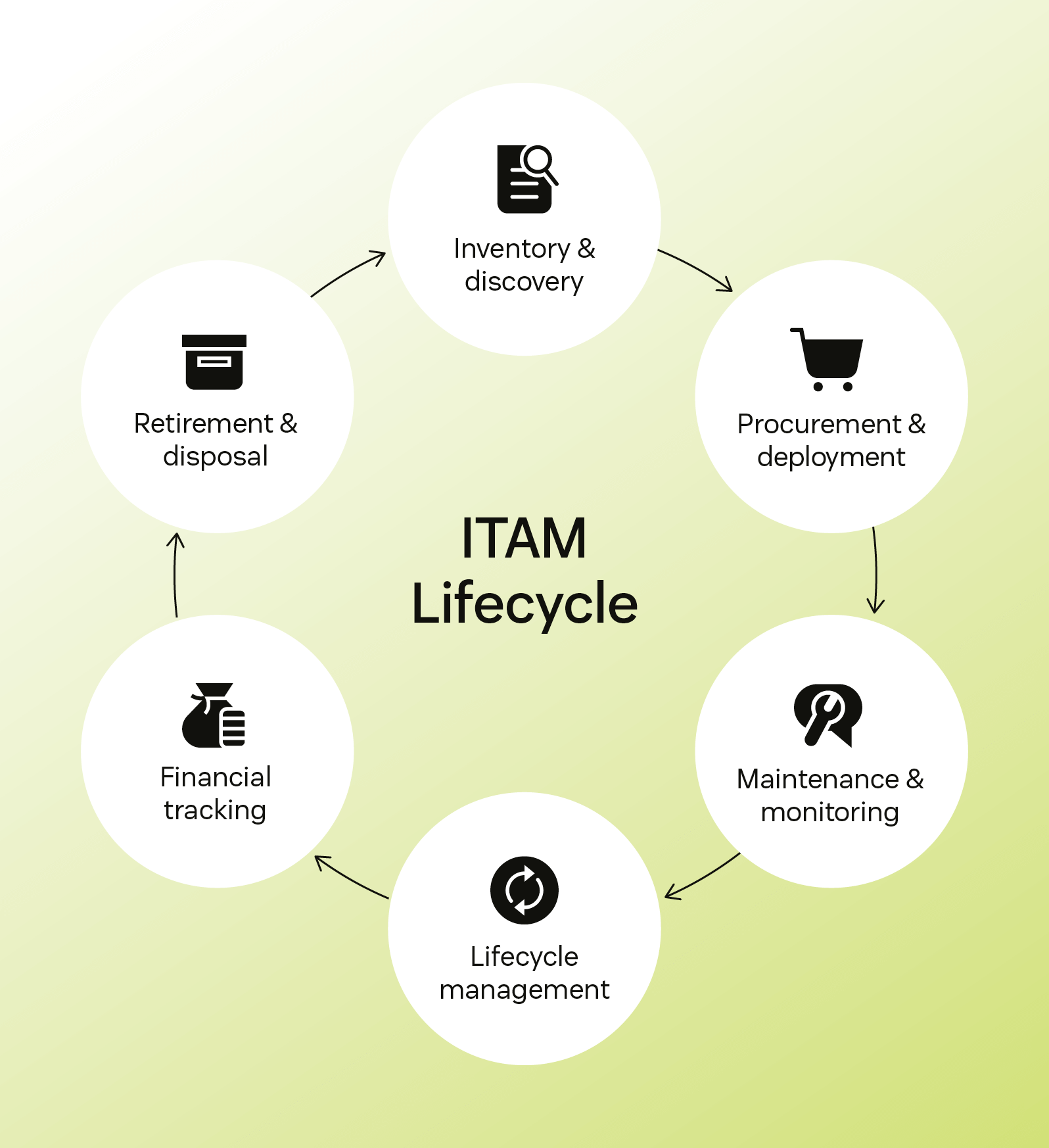
ITAM is an ongoing process rather than a one-time project. A strong strategy manages assets across the entire lifecycle, from acquisition to secure retirement.
Here are the core processes:
Inventory and discovery: Build a complete, up-to-date record of your IT assets. You can do this manually, but most organisations use automated tools to make it easier and more accurate.
Procurement and deployment: Acquire the right assets, configure them, assign them to users, and track location and usage.
Maintenance and monitoring: Track performance, usage, and health. Schedule updates and repairs as needed.
Lifecycle management: Based on asset age and performance, plan ahead for upgrades or replacements. This avoids disruptions and ensures employees always have the tools they need.
Financial tracking: Monitor total cost of ownership (TCO) of each asset, including purchase, maintenance, support, and disposal.
Retirement and disposal: When it’s time to retire an asset, decommission it securely. That includes wiping data and disposing of equipment to meet data privacy and environmental standards.
IT asset management (ITAM) best practices
Effective IT asset management requires more than tracking assets, it depends on consistent processes and reliable data. Without clear practices, asset data can quickly become outdated or incomplete. These best practices build a more accurate and scalable ITAM approach.
Combine automated and manual asset tracking for accuracy
Automated discovery tools identify assets across networks and systems in real time. However, they may miss offline devices or incomplete records. Regular manual audits fill gaps in asset data, especially when teams rely on internal documentation like a help centre. Combining both approaches ensures a more complete and reliable inventory.
Standardise and normalise asset data across systems
Asset data often comes from multiple tools, each using different formats and naming conventions. Standardising how assets are labeled and categorised improves consistency across systems. This makes it easier to search, report, and maintain accurate records, similar to following knowledge base design best practices. Clean, consistent data is essential for reliable ITAM processes.
Align ITAM with ITSM, finance, and procurement
ITAM works best when it’s connected to other business functions. Integrating with an IT service desk links assets to incidents, requests, and changes. Coordination with finance and procurement ensures assets are tracked from purchase to retirement. This alignment creates a more unified and efficient asset lifecycle.
Start with high-impact assets and scale gradually
Trying to manage every asset at once can slow progress and create unnecessary complexity. Instead, focus first on high-value or high-risk assets, such as critical hardware or licenced software. This establishes processes and demonstrates value early. From there, ITAM practices can expand more effectively across the organisation.
Track cost, usage, and sustainability metrics
Tracking asset data should go beyond basic inventory. Monitoring cost, usage, and lifecycle status showcases how resources are being used over time. Including sustainability metrics, such as device lifespan or e-waste, supports responsible asset management. These insights guide more informed decisions as environments evolve.
Treat ITAM as a continuous improvement process
ITAM is not a one-time setup, it requires ongoing attention and updates. Regular reviews ensure asset data stays accurate and processes remain effective. As technology and business needs change, ITAM practices should adapt as well. Continuous improvement keeps asset management aligned changes across the organisation’s technology landscape.
Common challenges in IT asset management and how to overcome them
Even with the right strategy, IT asset management can be difficult to implement and maintain. As environments grow more complex, gaps in data, processes, and ownership can quickly emerge. Understanding these challenges is the first step to building a more reliable ITAM approach.
Fragmented data and limited visibility
IT asset data is often spread across multiple tools, teams, and systems. This fragmentation leads to inconsistent records and makes it difficult to get a complete view of assets. Without a reliable source of truth, decisions are based on incomplete or outdated information. To address this, organisations can integrate data sources into a centralised system that provides consistent, up-to-date visibility.
Inaccurate inventory and poor data quality
Outdated or incomplete asset records can quickly undermine ITAM efforts. Missing devices, duplicate entries, or incorrect details make it harder to track usage and maintain control. These gaps are often the result of relying on a single method of asset tracking. Combining automated discovery with regular physical audits improves accuracy and keeps inventory data reliable over time.
Lack of standardisation and clear ownership
When processes vary across teams, asset data becomes inconsistent and harder to manage. Without clear ownership, updates may be delayed or overlooked entirely. This creates gaps in accountability and makes the data less reliable. Establishing standardised workflows, clear policies, and defined ownership ensures assets are managed consistently across the organisation.
Low adoption and resource constraints
ITAM initiatives often struggle when teams lack time, tools, or buy-in. Manual processes and competing priorities can slow progress and limit adoption. Without early results, it becomes harder to maintain momentum. Focusing on high-impact use cases, providing training, and using automation can enable teams to demonstrate value and scale ITAM more effectively.
Frequently Asked Questions
ITAM focuses on managing IT assets such as hardware, software, and cloud services, whereas IT service management (ITSM) is about delivering and supporting IT services.
ITAM supports ITSM by providing accurate and up-to-date asset data. In fact, many of the latest ITSM trends highlight the increasing importance of robust asset data for everything from AI-powered service desks to proactive issue resolution.
ITSM focuses on delivering and managing IT services like handling incidents, managing change, and keeping systems running smoothly. Enterprise service management (ESM) applies those same practices across other departments, like HR, facilities, and legal.
The goal is to bring ITSM’s structure and efficiency to the rest of the organisation so every team can deliver better service and support. If you’re wondering how they compare, this breakdown of ITSM vs. ESM highlights the key differences and benefits.
An IT asset management (ITAM) database is a centralised system that stores and organizes information about all IT assets. It acts as a single source of truth, enabling teams to track, manage, and report on hardware, software, and cloud resources.
The primary objectives are to reduce IT costs, manage risk, and increase operational efficiency.
An IT asset specialist tracks and manages assets throughout their lifecycle. This includes procurement, deployment, compliance, and secure disposal, often using an ITAM database to stay organised.
Power up your ITAM strategy with Zendesk
ITAM is not just about keeping tabs on hardware. It is about creating a seamless experience for employees and reducing complexity for your IT department. When integrated with your IT service desk, a strong ITAM strategy gives support agents the context they need to deliver faster, smarter service.
At Zendesk, we partner with leading ITAM platforms that work seamlessly with your existing tools. This allows you to centralise asset data, improve response times, and gain complete visibility into your IT environment.
Justine Caroll
Director, Product Marketing
Justine is a product marketing leader with 15+ years of experience in B2B SaaS and consumer technology. She leads Zendesk's Employee Service product marketing team, helping departments like IT and HR deliver exceptional service through AI-powered, easy-to-use tools. Her favourite part of the job? Launching products that truly help customers and deliver real impact.
See ITAM in action
Get a clear view of your assets and deliver faster, more informed support with Zendesk.