New
Hide.fy
Instantly control what agents see in Zendesk — hide groups, fields, and forms with zero code.
Works with
Support
Developer
vaide.app
About this app

Your agents are losing time on options they should never see.
Every unnecessary group, field, or form in Zendesk is a decision your agents have to make — and most of those decisions are the wrong ones. That means slower tickets, routing errors, and support processes that are hard to enforce at scale.
Hide.fy gives you instant, fine-grained control over what each agent sees in Zendesk. No code. No workarounds. Rules apply in real time, directly inside Zendesk Support.
The problem with a cluttered Zendesk
When agents see everything, they do the wrong thing.
Tickets get assigned to the wrong group
Forms are filled out incorrectly because irrelevant fields appear
New agents need longer onboarding because the interface is overwhelming
Sensitive internal groups are visible to agents who shouldn't know they exist
Admins spend hours chasing preventable mistakes in the queue
How Hide.fy solves it
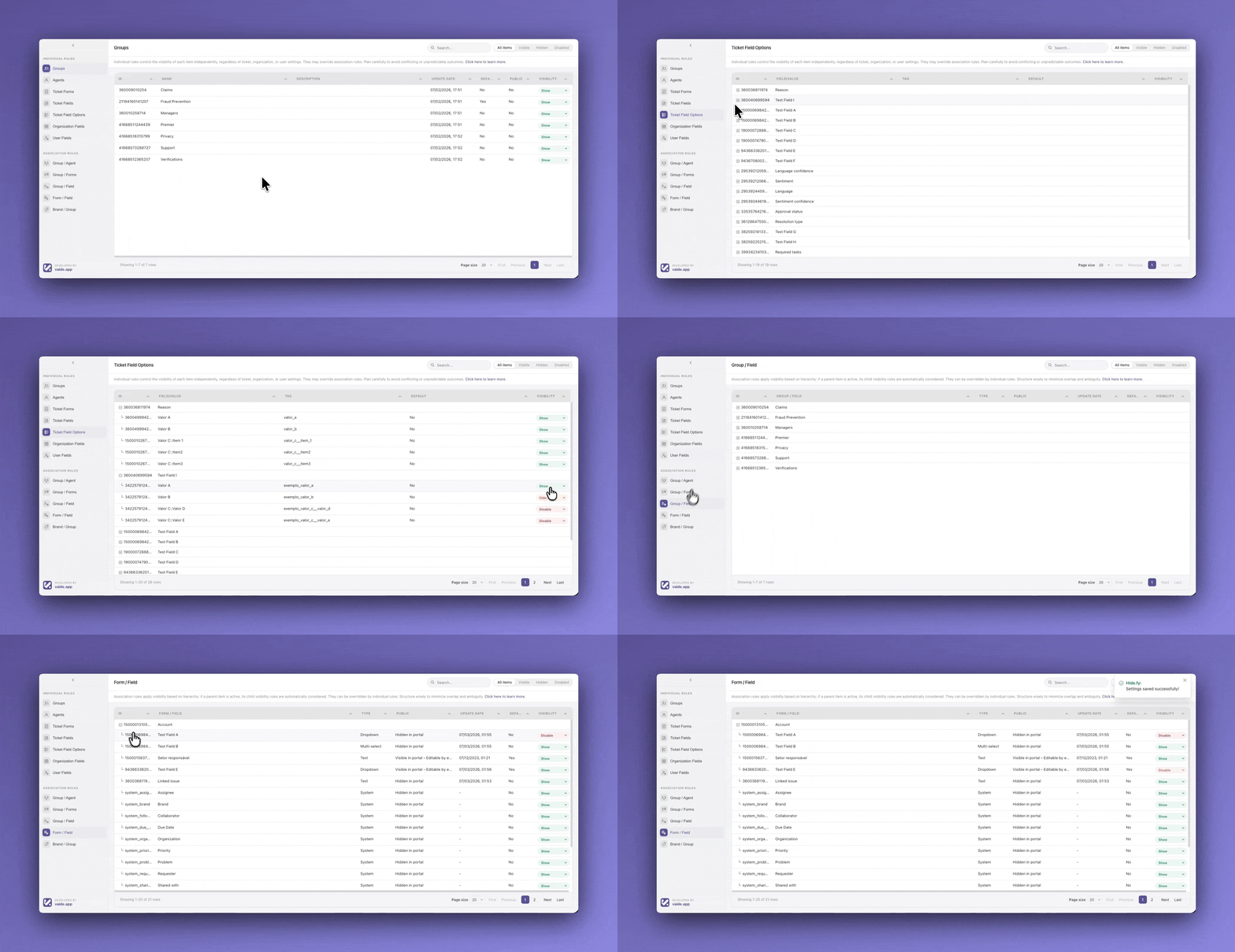
Hide.fy lets you define exactly what each agent, group, or brand sees — and everything else disappears. Automatically.
You control visibility for:
- Groups — hide internal or irrelevant assignment targets per agent or team
- Agents — restrict which agents appear in assignment options
- Ticket Forms — show only the forms relevant to each brand or group
- Ticket Fields — remove fields that don't apply to a given workflow
- Field Options — hide individual dropdown values that shouldn't be selectable
- Organization Fields — scope organization data views by team
- User Fields — control what agents can see on customer profiles
Rules are built visually in a central dashboard and take effect immediately — no deploys, no configuration files, no developer required.
What your team actually gains
Faster ticket handling. Agents spend less time parsing irrelevant options and more time resolving issues.
Fewer routing errors. Assignment dropdowns only show valid targets, so tickets land where they should.
Cleaner onboarding. New agents see a scoped Zendesk that matches their role from day one.
Enforced processes. Compliance, priority handling, and brand-specific workflows are reflected in the interface itself.
Reduced admin overhead. One dashboard to manage visibility across your entire support operation.
Key features
Visual rule builder — no code required
Smart associations: Group → Agents, Group → Forms, Form → Fields, Brand → Groups
Real-time updates across all agent sessions
Works on ticket view, new ticket, organization sidebar, and user sidebar
31 languages supported
Bulk management for large team configurations
Common configurations
| Goal | How Hide.fy handles it ||---|---|| Hide internal escalation groups from frontline agents | Group visibility rule scoped by agent group || Show only billing forms to the finance team | Group → Form association || Restrict priority field options to senior agents | Field option visibility by agent || Display brand-specific forms only | Brand → Group → Form chain || Simplify ticket view for specialized queues | Form → Field association |
Data handling
Hide.fy is privacy-first by design. Visibility settings are stored as Zendesk app metadata and evaluated locally inside the Zendesk client. No ticket content, customer data, or agent activity is sent to external servers.
Built by vaide.app
Hide.fy is developed by vaide.app, a team specializing in Zendesk customization and support operations tooling.
Questions or want a setup walkthrough? Reach us at support@vaide.app.
App details
How to install
- Search for Hide.fy in the Zendesk Marketplace and click Install — no settings required at this step
- In Zendesk Admin Center, go to Apps and Integrations > Zendesk Support Apps to confirm the installation
- Click the Hide.fy icon in the Zendesk navigation bar to open the dashboard
- Select a section (Groups, Agents, Forms, Fields, etc.), set each element to Show, Hide, or Disable, and save — changes apply instantly
Requires admin access. Questions? support@vaide.app
Leave a review
Share your experience with the rest of the Zendesk community