Jira by Git-Zen
Create Jira issues from Zendesk, sync comments both ways, and close the loop between support and engineering. No Jira license needed for agents. Free trial included.
Works with
Support
Developer
Git-Zen
About this app
Jira by Git-Zen
Every bug report in Zendesk eventually becomes a Jira issue. Right now that handoff is manual. Copy-pasted summaries, lost context, and nobody knows what's actually in progress.
Git-Zen automates it. Agents create Jira issues from tickets in one click. Developers reference ticket numbers and the link is instant. Updates flow both ways, automatically.
How It Works
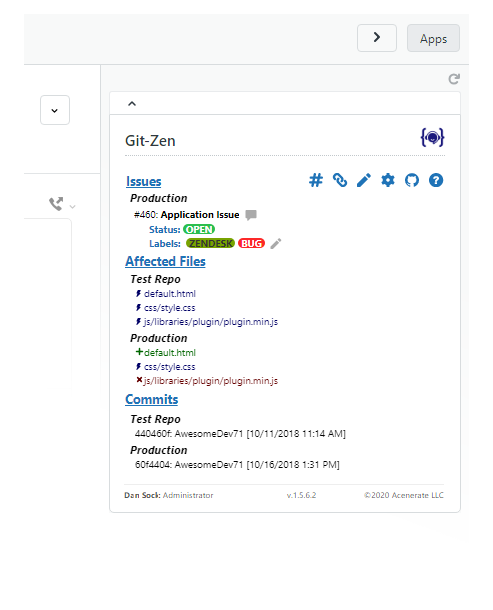
From a Zendesk ticket, agents can:* Create a new Jira issue in one click: Bug, Story, Task, Epic, or any issue type in any project* Set project, issue type, priority, labels, fix version, sprint, and assignee at creation time* Link an existing Jira issue to the ticket* See all Jira updates and comments appear automatically in the ticket timeline
From Jira, your engineering team can:* Reference a Zendesk ticket number in any Jira comment. the issue appears in the ticket automatically* Leave Jira comments that flow into Zendesk as public or private notes
No Jira account needed for support agents. No Zendesk access needed for your engineering team.
Key Features
- Create Jira issues from Zendesk: Any issue type, any project. Bug, Story, Task, or Epic in one click from the ticket
- Full Jira field support: Project, issue type, priority, labels, fix version, sprint, and assignee set at creation time
- Two-way comment sync: Jira comments appear in Zendesk; ticket comments post to Jira
- Multiple issues per ticket: Link as many Jira issues as needed to one ticket, and vice versa
- Auto-tagging: Zendesk tickets are automatically tagged when linked or when issues are resolved
- Role-based permissions: Control which agents can create or modify Jira issues
- Simple per-agent pricing: $4 per Zendesk agent, per month. Unlimited tickets and integrations. Free trial included.
Works with Jira Cloud.
Security
Git-Zen does not store your Zendesk or Jira data. Only configuration settings are held on Git-Zen servers. Authentication uses OAuth 2.0.
For more information, visit https://www.git-zen.com
App details
How to install
Setting Up Jira by Git-Zen
1. Install the App
- Open any Zendesk ticket and click the Apps sidebar.
Authorize Zendesk
Authorize Jira
Configure your organization settings
You're all set!
Leave a review
Share your experience with the rest of the Zendesk community